
We Put Finance, Support and Sales Inside Teams. Here's How.
Value iT connected its own systems to an AI assistant in Microsoft Teams using the MCP protocol. The team asks in plain language, the assistant queries the systems and only writes after confirmation. See the architecture and how to bring the same design to your company.
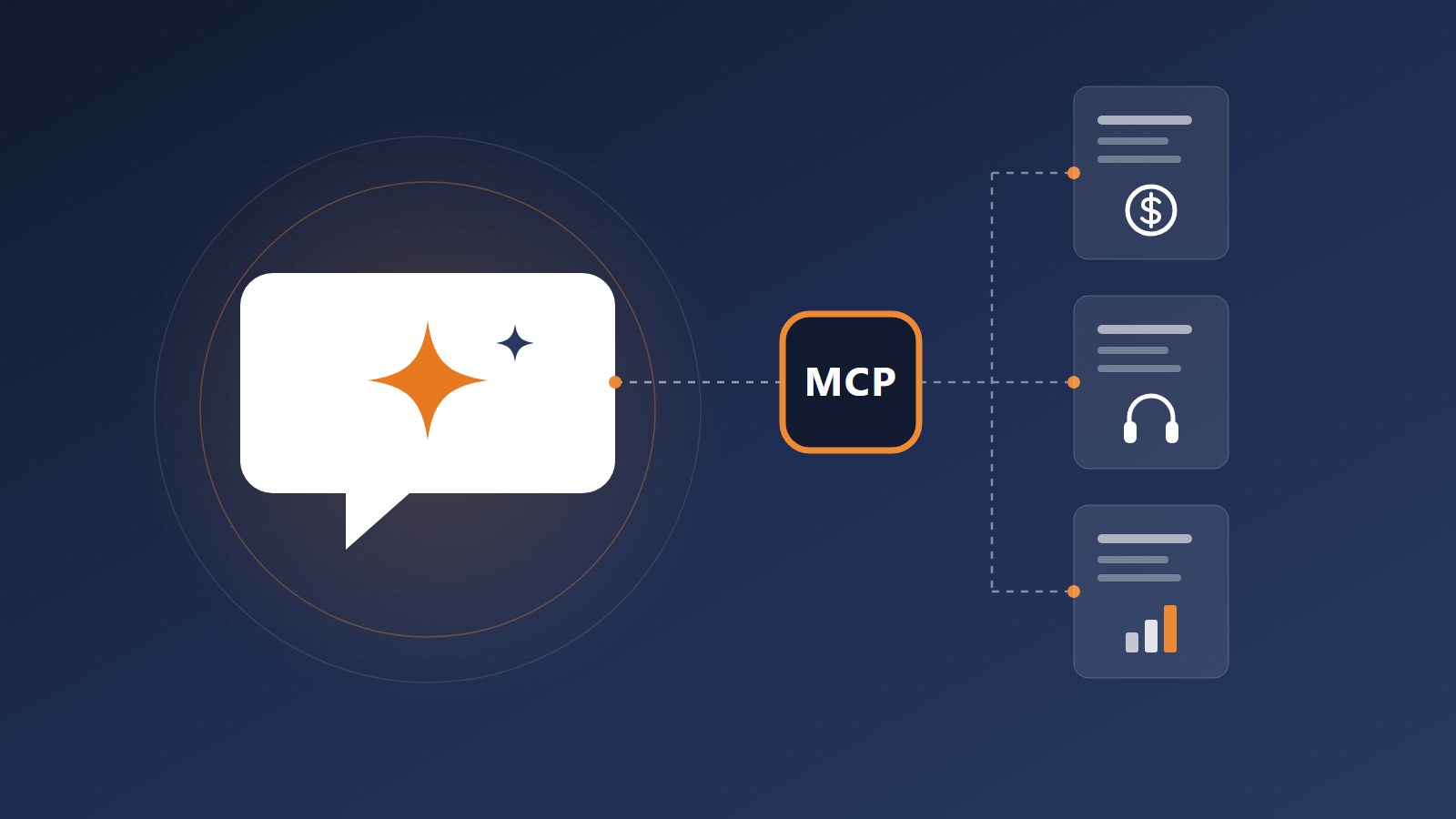
"How much did we bill this client this year, and how many support hours did they use?"
The question is simple. The answer almost never is. Someone opens the finance system, then the ticketing system, exports two reports and stitches everything together in a spreadsheet. Half an hour later a number shows up, and nobody is sure the filters were right.
The information exists. It is just scattered. And the more systems a company has, the more time goes into searching instead of deciding.
At Value iT, we solved this at home first. We connected our systems to an AI assistant in Microsoft Teams. Today the question above is asked in plain language, in a chat, and the answer arrives in seconds. It is in production, on our own finances. It is not a demo.
What changed in our daily work
The assistant lives in Teams, as a chat app. Nobody installed anything new or had to learn another screen. It serves three departments:
- Finance. Balances, revenue and expenses by period and by client, payables and receivables, cash flow projection. And it goes beyond queries: it creates, changes, splits into installments and transfers entries by chat, always with confirmation.
- Support. Tickets per client, hours used, open tickets and first response time.
- Sales. Reports and queries on partner commissions and incentives, the channel compensation we receive as partners of Microsoft and of the distributor Ingram Micro. Here the assistant is read-only.
The biggest gain is in combining them. Because each client is recognized across all systems, you can ask in the same conversation:
- "Which clients opened the most tickets this quarter, and how much revenue did each one represent?"
- "What do we have to receive in the next 30 days?"
- "Post this month's commission invoice, split by order and by client."
When a detail is missing, such as the category or the cost center, the assistant looks at how similar entries were posted before and proposes the same, instead of sending back a list of questions.
How it works: three pieces, each with a role
- Microsoft Teams is the front desk. It is where people talk.
- The AI agent in Microsoft Foundry is the brain. It understands the question and decides what to look up.
- The MCP tool server is the hands. It fetches the data, does the math, writes and enforces the rules.
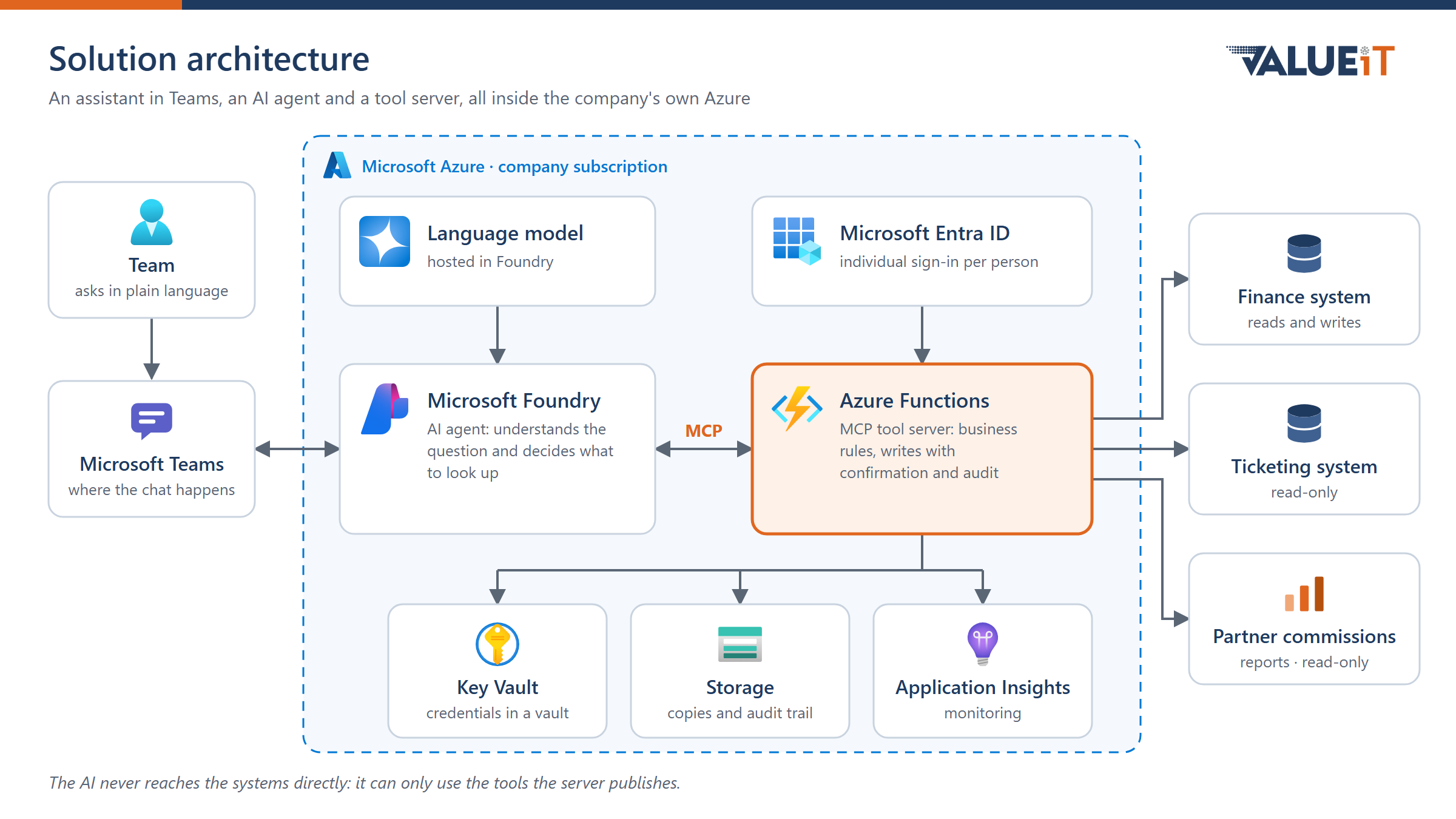
Everything runs in the company's own Azure: the AI model is hosted in Microsoft Foundry, inside our environment, and the data does not leave the contracted Microsoft environment. The server is an Azure Function, billed by usage, with no machine running all day.
What MCP is and why it matters
MCP (Model Context Protocol) is an open standard for connecting AI assistants to systems. Think of a universal socket: the same server works with more than one assistant, today and tomorrow. The company is not locked into a single AI vendor.
But the main point is a different one. The AI never reaches the systems directly. It only sees a closed set of tools published by the server. If there is no tool for something, the AI cannot do it, even if someone asks.
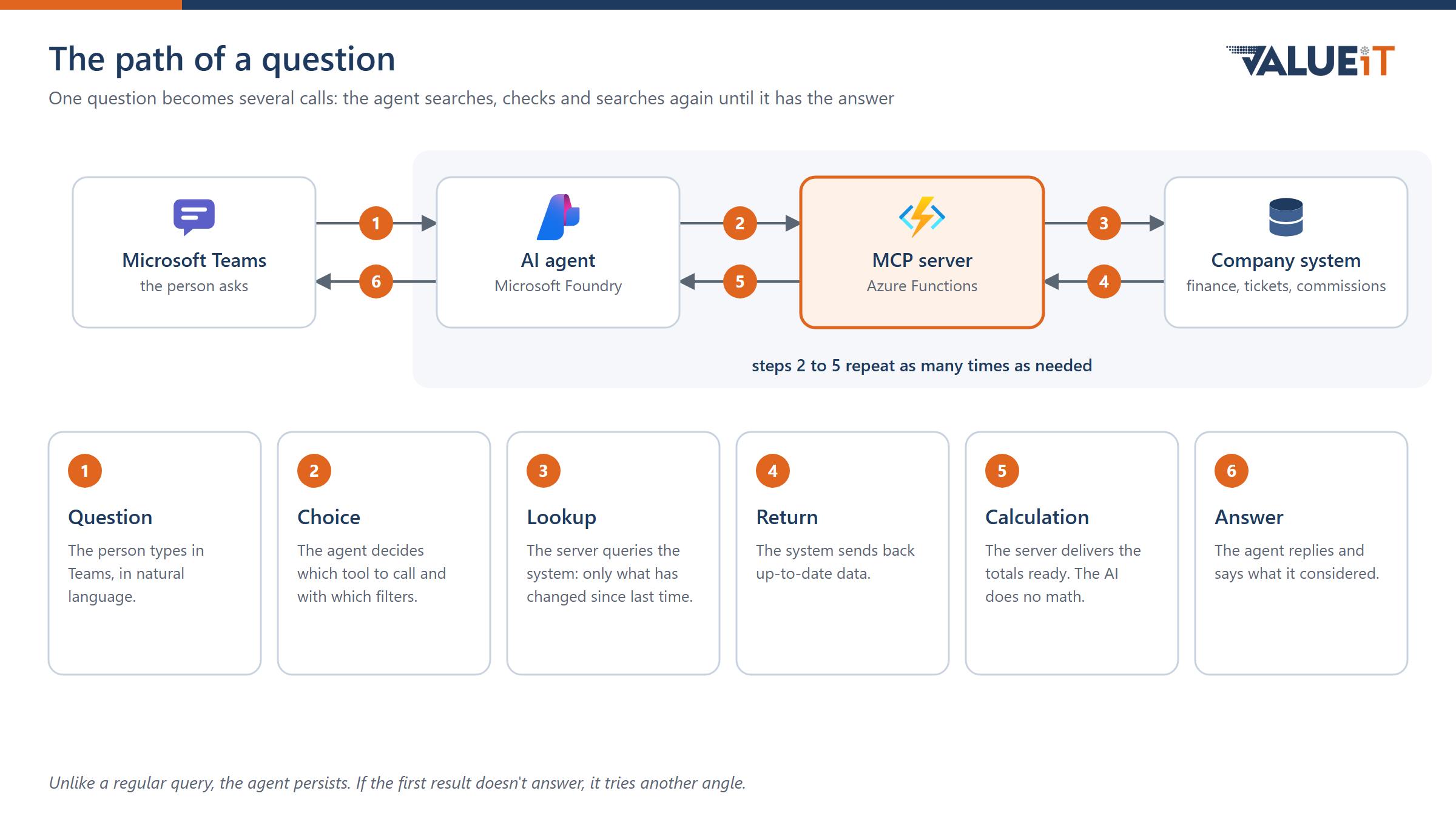
Two details of this path make a real difference. The math is done by the server, not by the AI, which receives the totals ready. And the agent persists: if the first result does not answer the question, it tries another angle before getting back to you.
Security: the rules live in the code, not in the AI's goodwill
Giving an AI access to finance only makes sense with rules it cannot get around. That is why the guarantees are in the server:
- Individual Microsoft sign-in (Entra ID). Each person signs in with their own account, and only authorized people can use it. There is no shared password.
- Nothing is written without confirmation. The assistant builds the plan, shows it and asks whether it can write. It only writes after a yes.
- The proposal is valid for 10 minutes, works only once, and only the person who proposed it can confirm it.
- Automatic verification. The system compares cash before and after each write: only what was in the plan may have changed.
- Audit. Every operation is logged with who did it, what changed and when.
- Secrets in a vault. System credentials are kept in Azure Key Vault, never in files or code.
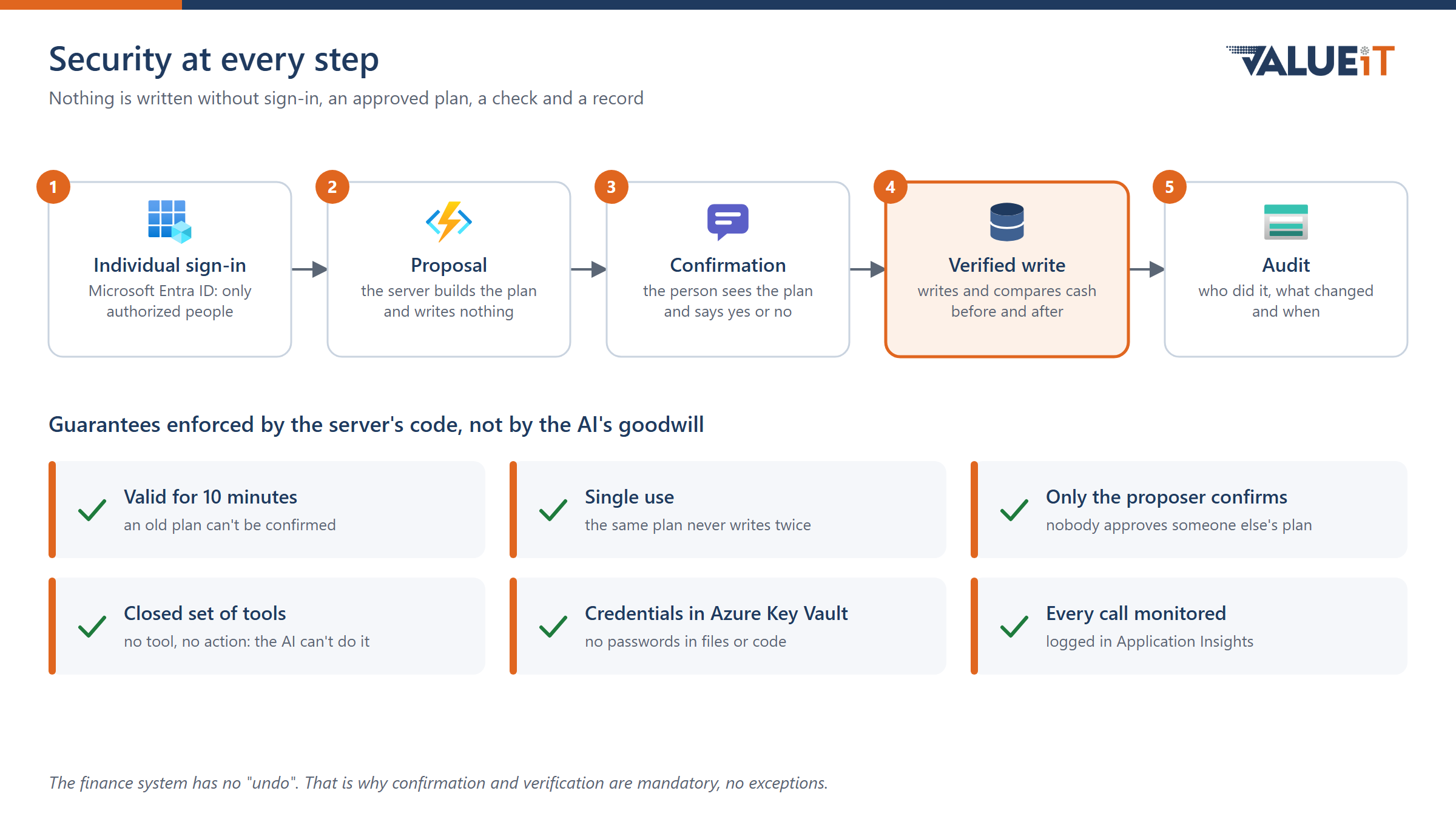
The AI proposes. The person confirms. The server verifies and records.
What we learned along the way
The first design was discarded. We started with an off-the-shelf data agent. It translated the question into a single query and did not persist when the answer came back incomplete. An agent with its own tools searches, checks and searches again. That is the one we kept.
With no "undo", care doubles. Our finance system has no test environment and no undo button. Every new write function was tested with a symbolic amount of R$ 1.00 and a future date, with cleanup at the end.
Reading is different from writing. Today the assistant writes only to finance. For tickets and commissions it is read-only. Opening write access to a system is a business decision, made case by case.
One foundation, many departments
We started with finance. Then came support. Then sales. At no point did we rebuild what already existed: each new system became one more set of tools on the same server, with the same sign-in, the same rules and the same audit trail.
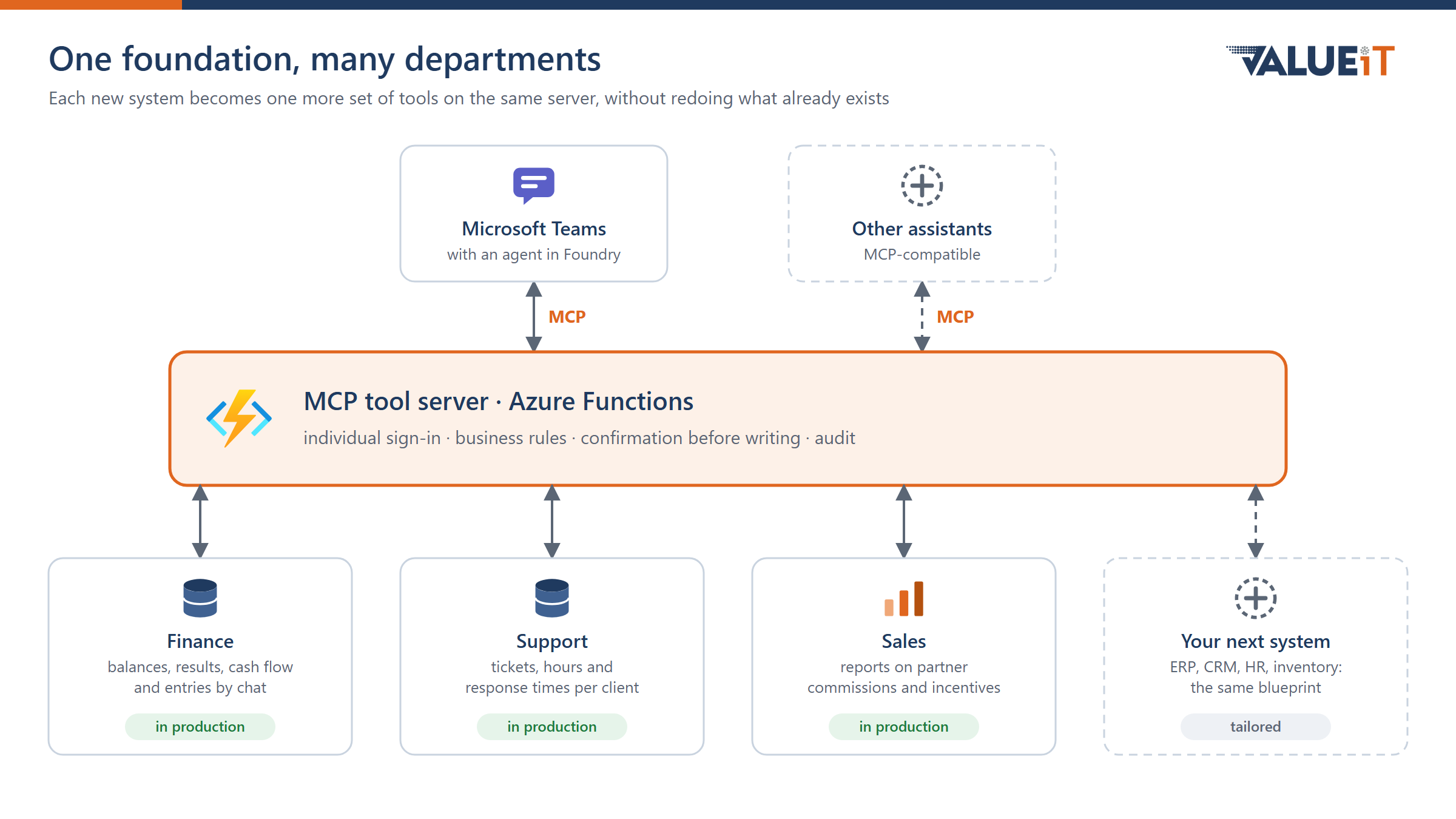
This is the most important argument for anyone evaluating the idea: you do not need to integrate everything at once. Start with the system your team queries the most and expand when it makes sense.
How Value iT brings this to your company
Value iT is a Microsoft Partner and builds for clients the same design it uses at home:
- Systems assessment. We map where the information lives, which questions your team asks most and what each system allows access to.
- MCP tool server. We build, in your company's Azure, the tools for querying and, where it makes sense, for writing, with your business rules.
- Assistant in Teams. We publish the agent in Microsoft Foundry and in Teams, with individual sign-in and access only for the people you authorize.
- Ongoing support. We tune the assistant based on real usage and add new departments to the same server.
This post is a companion to another one: in Is Your AI Secure? we talked about bringing AI inside the company. Here, the next step: giving it controlled access to your systems.
Learn about our Artificial Intelligence and automation services.
Want to see which of your company's systems could answer in Teams? Talk to a Value iT specialist and schedule an assessment conversation.
Value iT
Value iT
Want to know more about our solutions?
Get in touch and discover how we can help your company.
Talk to a specialist