
Is Your AI Secure? Bring ChatGPT and Claude Inside Your Company
Microsoft 365 Copilot runs models from the same families your team already uses, GPT and Claude, on your company's email, files and meetings, with security policies turned on. Here's how to move away from shadow AI without banning anything.
Be honest. This morning someone on your team pasted a customer spreadsheet into ChatGPT. Someone else asked Claude to review a contract. Nobody told IT, and nobody knows where that data went.
There's a name for this: shadow AI, AI used on the side, with personal accounts, outside company policies. And it's already present in a large share of mid-sized companies.
Banning it doesn't work. People use AI because it works. The answer is different: bring that AI in-house, with the same models your team already likes and the security your company needs.
The cost of leaving AI outside
When a company document is pasted into an AI tool on a personal account, it leaves the environment the company controls. From then on:
- Nobody knows what was sent or what came back. There's no record for audits or investigations.
- The data usage rules are those of the personal account, not those of a company contract.
- The "Confidential" label gets left behind. The pasted text becomes just another snippet.
- When the person leaves the company, the history leaves with them.
The problem isn't the tool. It's the lack of control.
What few people know: Copilot already has GPT and Claude
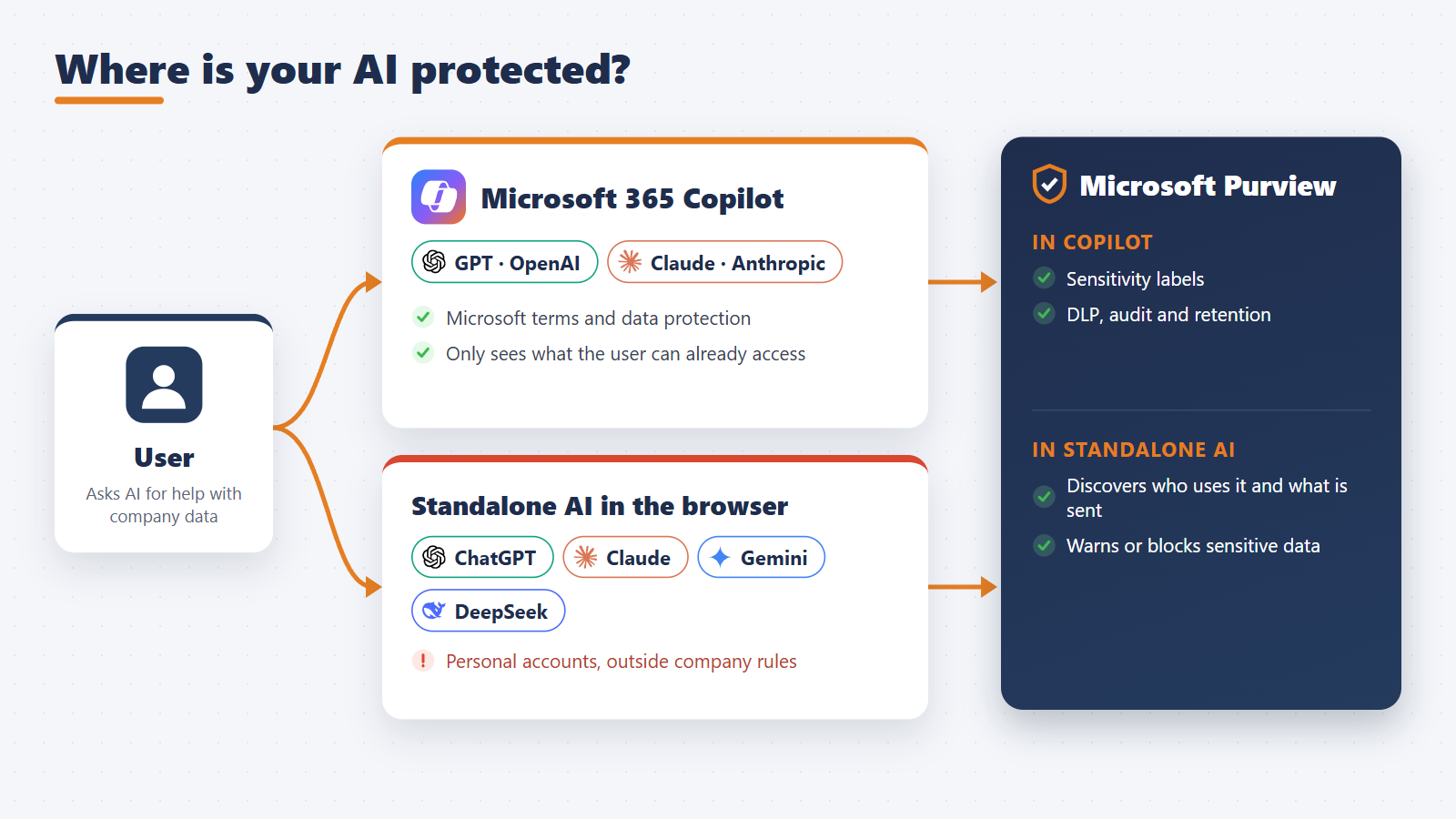
Microsoft 365 Copilot isn't "a single AI". Microsoft combines GPT models from OpenAI and Claude models from Anthropic in the same assistant (Microsoft Tech Community). In the Researcher agent, for example, GPT drafts the report and Claude reviews it before it reaches you.
In other words: people who like ChatGPT or Claude find models from the same families in Copilot. The difference is where that AI works and which rules it follows:
- It works with what belongs to the company. Microsoft 365 email, documents, meetings and chats, with no copy and paste.
- Microsoft terms apply. Anthropic acts as a Microsoft subprocessor, under the Microsoft Product Terms and Data Protection Addendum (Microsoft Learn).
- Company data doesn't train the models (Microsoft).
- Each person only sees what they already have permission to access (Microsoft Learn).
Google's Gemini is not part of Copilot. For Gemini and other outside AI tools, protection comes from Microsoft Purview, as we show below.
The AI does the work, sensitive data doesn't leak
This is what no personal account offers. Inside Microsoft 365, Microsoft Purview covers Copilot end to end (Microsoft Learn):
- DLP for Copilot. Data loss prevention policies stop Copilot from processing labeled files and emails, such as "Highly Confidential", and prompts with sensitive data, such as tax IDs or credit card numbers (Microsoft Learn).
- Sensitivity labels. Copilot shows the label in its responses, and content created from a confidential file inherits the same label.
- Audit and eDiscovery. Prompts and responses are logged and can be searched in investigations and legal cases.
- Retention. The company decides how long AI conversations are kept (Microsoft Learn).
- Insider risk. Purview helps detect risky AI usage, such as attempts to manipulate the assistant.
The same AI your team already likes. Now with company policies turned on.
"But we already have ChatGPT Enterprise or Claude Enterprise"
A great start. Enterprise plans are much better than personal accounts: there's a contract, an admin console and control over who uses them. Even so, take a closer look:
- Purview can see, but it can't block inside them. These plans can be connected to Purview for visibility and auditing (Microsoft Learn), but Microsoft 365 sensitivity labels and DLP don't apply inside them. In Copilot, they do.
- Your data still lives outside Microsoft 365. Files, SharePoint permissions and company policies sit on one side; the AI sits on the other.
- Each plan comes from a single vendor. In Copilot, GPT and Claude are in the same place.
- A personal account is still one click away. Nothing stops someone from opening their own account in the browser.
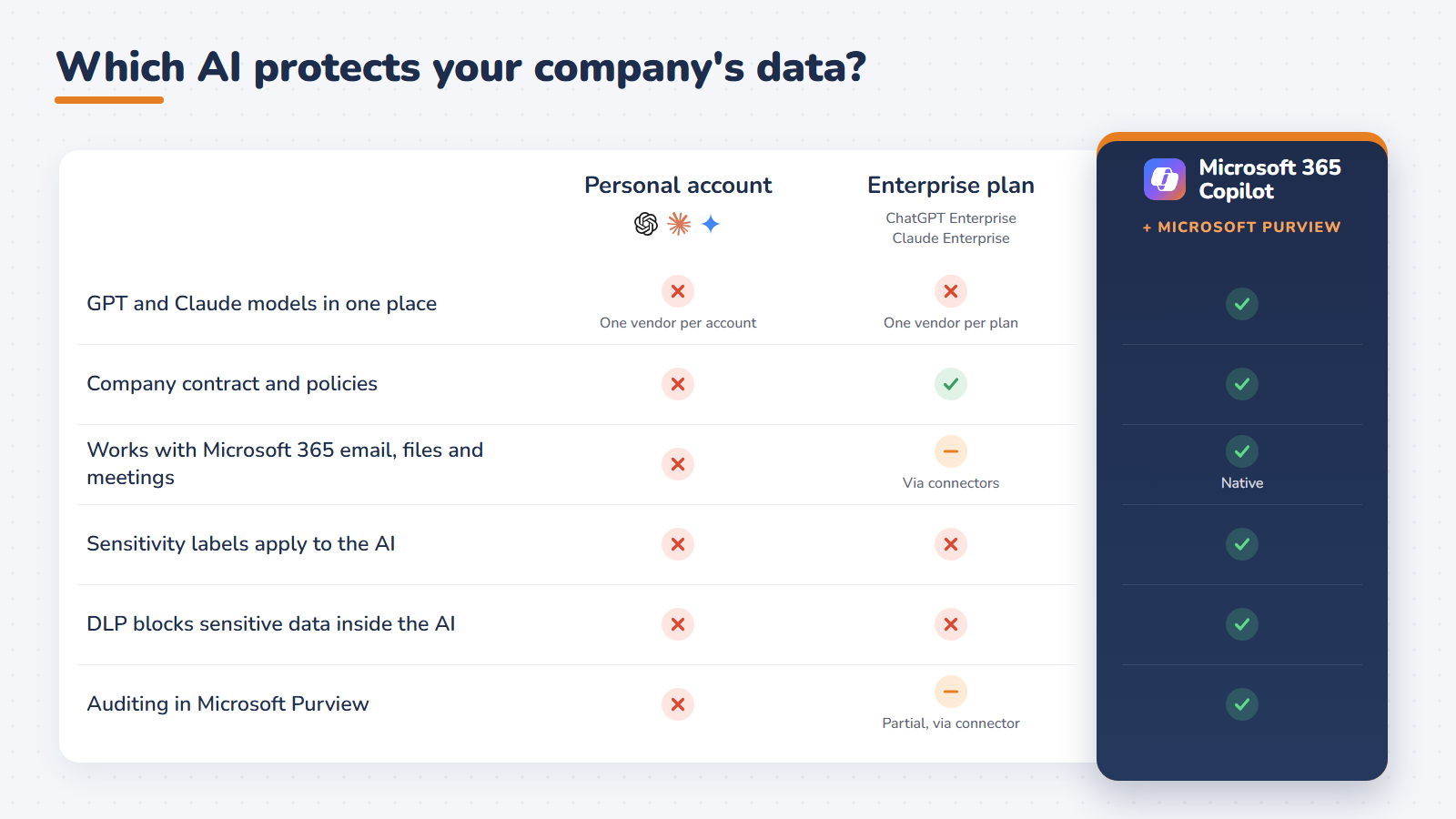
For most companies that already have Microsoft 365, the simplest path is to concentrate everyday AI in Copilot and keep other tools only where they make a difference, always under Purview's policies.
What about people who insist on using AI on the side?
It's important to be precise here: Copilot doesn't protect other AI tools. Microsoft Purview does (Microsoft Learn):
- Discover. Purview detects the use of third-party AI in the browser, such as ChatGPT, Google Gemini and DeepSeek, and shows what sensitive information is being sent (Microsoft Learn).
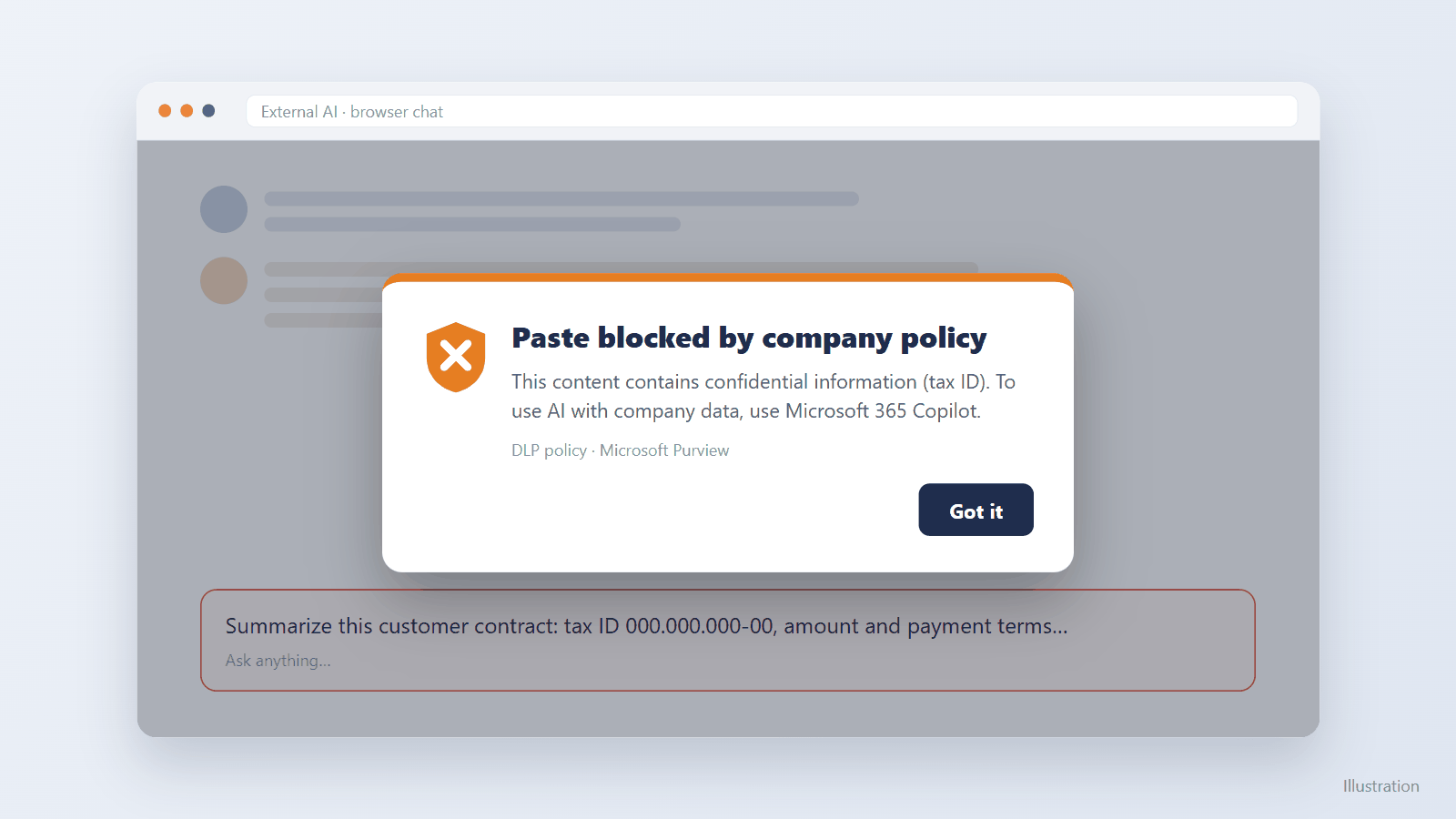
- Block. Company devices can warn or prevent users from pasting sensitive data into these sites.
People keep using AI, but company data stays where it belongs.
Already using Copilot? Check three settings
- In Brazil and most commercial tenants, Anthropic models are turned on by default. Only in the European Union, EFTA countries and the United Kingdom do they start turned off (Microsoft Learn).
- The admin decides who uses them, for the whole company or only for specific groups, in the Microsoft 365 admin center.
- Some newer models follow Anthropic's own terms, with data retention, and stay off until the admin enables them (Microsoft Learn).
It's worth aligning these choices with IT, legal and compliance, and telling your team what is allowed.
From shadow AI to enterprise AI in three moves
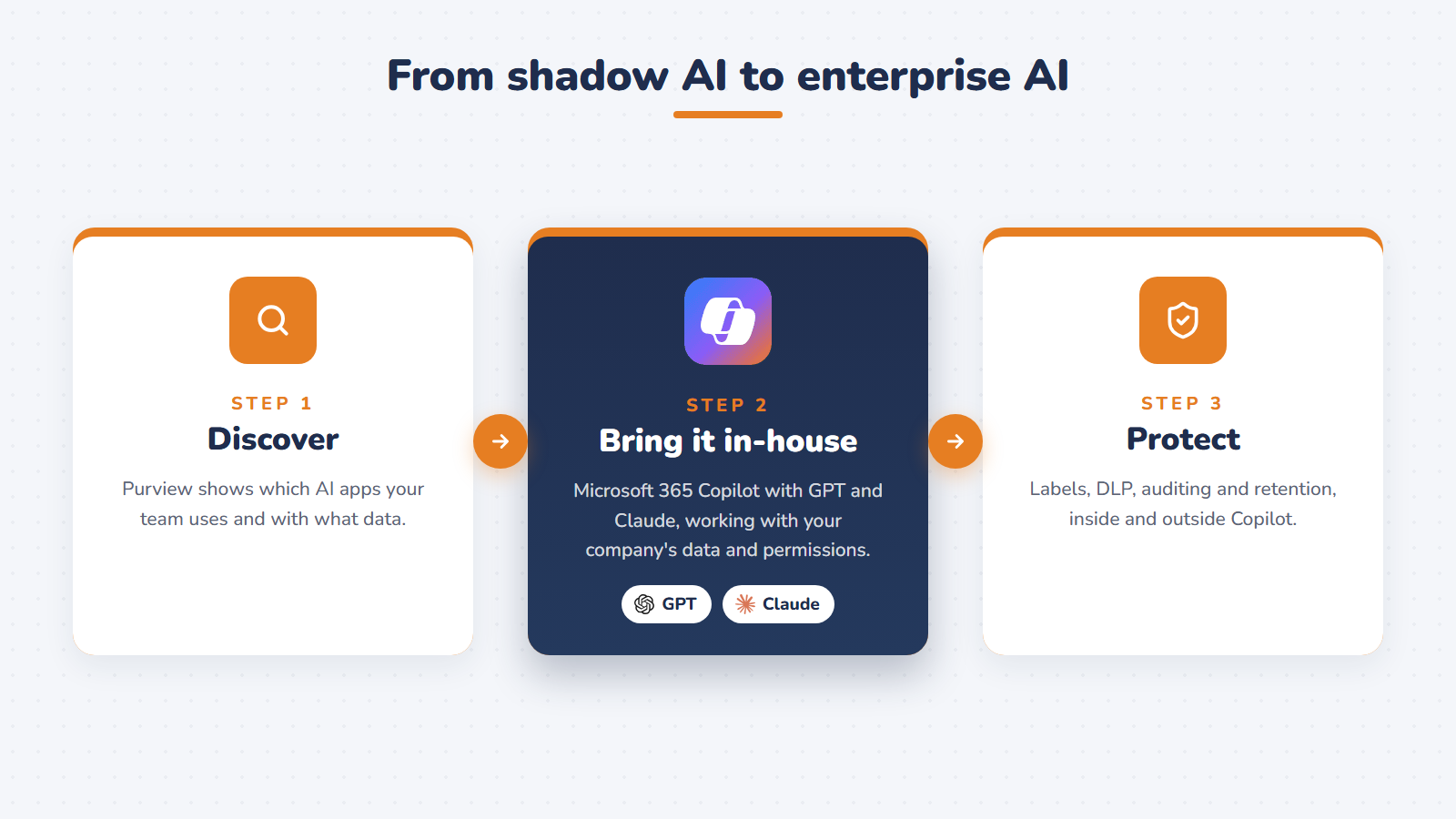
- Discover. Map which AI tools your team uses today and where sensitive data is at stake.
- Bring it in-house. Roll out Microsoft 365 Copilot, with GPT and Claude, and review permissions before expanding use. Folders that are too open become answers that are too easy.
- Protect. Create sensitivity labels and DLP policies for Copilot and for outside AI. Start with warnings and move to blocking once the rules are fine-tuned.
Available capabilities depend on your licensing. That's why it's worth assessing your company's scenario before choosing a path.
How Value iT helps
Value iT is a Microsoft Partner and takes mid-sized companies from shadow AI to corporate, protected AI, from Microsoft 365 Copilot licensing to Microsoft Purview configuration. We map your team's AI usage, review permissions, design sensitivity labels and configure DLP, audit and retention policies.
Learn about our Copilot for Microsoft 365 services and our Microsoft Purview consulting.
Find out how much AI is running outside your company's control. Talk to a Value iT specialist.
Is your AI secure? If it works outside the company, probably not. You don't need to ban AI. You need to bring it inside.
Sources
- Microsoft. Bringing Claude models in Microsoft Copilot into the EU Data Boundary, November 5, 2026.
- Microsoft Tech Community. Choosing the right AI model in Microsoft 365, June 25, 2026.
- Microsoft Learn. Anthropic models in Microsoft Online Services.
- Microsoft Learn. Data, privacy and security for Microsoft 365 Copilot.
- Microsoft Learn. Microsoft Purview data security and compliance protections for Microsoft 365 Copilot and other generative AI apps.
- Microsoft Learn. Use Microsoft Purview with Microsoft 365 Copilot and Copilot Chat.
- Microsoft Learn. Data Security Posture Management for AI.
- Microsoft Learn. Data loss prevention for Microsoft 365 Copilot and Copilot Chat.
- Microsoft Learn. Retention for Copilot & AI apps.
Value iT
Value iT
Want to know more about our solutions?
Get in touch and discover how we can help your company.
Talk to a specialist